
A picture is worth a thousand words and a video is worth a thousand pictures.
The new screencast feature allows you to:
- Record tab or desktop screen
- Download video as WebM file
- Upload videos to your YouTube or Google Drive account
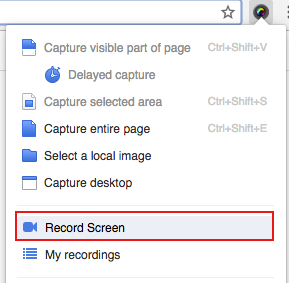
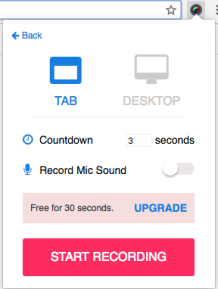
A picture is worth a thousand words and a video is worth a thousand pictures.
The new screencast feature allows you to:
 Awesome Screenshot Blog
That good keep it up Thanks….
LikeLike
Sweet! I will use it a lot!
LikeLike
🙂
LikeLike
Awesome one
LikeLike
How much is the upgrade? Why isn’t this info on your web site?
LikeLike
Awesome! Well done guys (Fideo)
LikeLike
Excellent!
LikeLike
YES!!!
LikeLike
Superb feature! I was waiting for record function from long!
LikeLike
Nice 😀
LikeLike
not interested this isn’t clear at all.
LikeLike
i guess that’s cool
LikeLike
great app
LikeLike
good
LikeLike
Wow! Excellent. What a nice surprise. Didn’t see that coming.
There’s a thing that it would be worthy for paying the upgrade.
LikeLike
Wow! Excellent. What a nice surprise. Didn’t see that coming.
There’s a thing that it would be worthy for paying the upgrade.
LikeLike
Thanks for this update. You peoples are really Awesome!
LikeLike
awesome
LikeLike
A GIF file would be perfect!
LikeLike
This.is.awesome.
LikeLike
Awesome Screenshot new version
LikeLike
Awsome 🙂
LikeLike
A video is worth (frame rate x duration) pictures 🙂
LikeLike
Whoa, that’s awesome! Thanks for the addition. I’ve made Awesome Screenshot a part of my essential work tools, and this ability to record videos makes it even more useful. Good job!
LikeLike
Awesome!!
LikeLike
Great work.
LikeLike
Finally!!!
LikeLike
Cool 😉
LikeLike
AWESOME!
LikeLike
hehehe
LikeLike
nice update
LikeLike
Only 30 seocnds?? 😦
LikeLike
Awesome as usual! Thank you!
LikeLike
can you use a mic and the sound from your microphone be recorded?
LikeLike
Nice!
LikeLike
Wow, great features!
LikeLike
Reblogged this on Rádio Somos Todos Primos and commented:
dd
LikeLike
Sounds interesting. What’s a good example of how this feature might be used?
LikeLike
wooo!!!
Great tool, I love, can recording screen when I work code
LikeLike
I HATE THIS THING.
LikeLike
pretty cool… i’ll compare it to my present screen caster.. you may have me deleting another app.
LikeLike
Fantastic! Glad you decided to go with WebM video encoding. I use your plugin at work all the time, can’t wait to integrate this into my workflow. It’ll be nice to send live-proofs, and instructional videos without having to bootstrap an entire software suite.
LikeLike
Wow, nice!
LikeLike
Nice!! Too bad it’s only 30 seconds for free, but still amazing improvement to only screenshots 🙂
LikeLike
What a great update! Thank you!
LikeLike
why
LikeLike
ok
LikeLike
COOL!! Thanks soo much
LikeLike
I was in the middle of editing an image that I cannot capture again – the app updated in the middle of my editing and deleted the image. Quite disappointing and frustrated that the app did that to me. 0-stars.
LikeLike
@Chuk, sorry for the issue.
LikeLike
Nice Thanks
LikeLike